sql server

MS SQL: Insert Multiple Rows With One Query

Just figured this out. Using Microsoft SQl Server 2000, you can insert multiple rows into a table with one query as in the following examples:

Single Column:

CREATE TABLE test
(
val1 INTEGER NOT NULL
)

INSERT INTO test
SELECT 62
UNION
SELECT 91
UNION
SELECT 95
UNION
SELECT 98
UNION
SELECT 99

This will insert 5 rows into the table. To do multiple columns, use the following:

CREATE TABLE test
(
val1 VARCHAR(10),
val2 VARCHAR(10),
val3 VARCHAR(10),
val4 VARCHAR(10)
)
GO

INSERT INTO test
(val1, val2, val3, val4)

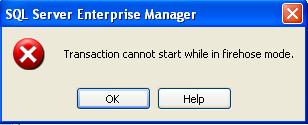
A Fun Error Message

Here's a fun little error message I encountered while using Microsoft's Enterprise Manager.

Firehose Mode

I don't even know what to say.

MS SQL: Using A Case Statement In A View

Here is a neat trick for using conditional processing in a view.

I needed to create a view that contained an employee id and employee name amongst other data. The original view included two joins, but for the sake of simplicity, I have altered the view. This view uses a case statement to determine which "full name" to show, the full name using the first name or the full name using the nickname if the employee has one.

SQL: Totaling A Column Containing Varying Values

I have been doing quite a few surveys recently and one of the tasks involved is mining the responses for data. Here's a neat trick I learned for totalling and counting responses using sql rather than programmatically on the front end.

Let's say you have a table of customers (tblCustomers) that houses the name of each person and the flavor of ice cream each customer prefers:

Spell Check In SQL

I was tasked yesterday with writing a spell checker for an up-and-coming application. I completed the meat of the functionality today, done in sql. It's actually very acurate, pulling most words within the first 15 suggestions, but many within the first 5. It uses a table comprised of 62,070 words (a dictionary I imported from a flat file word list), which speaks to the procedure's accuracy as there are many names, cities, acronyms, etc., with the corresponding soundex values.

sql server

User login